Posts

Showing posts with the label WINDOWS

Turn your WordPress blog into a Windows 10 app with the latest Windows App Studio update

Image
Microsoft's free Windows App Studio tools have added some new features for anyone who wants to make a quick and easy Windows 10 app without any coding. One of them will allow a WordPress blog to be displayed in a Windows 10 app. Microsoft says: "We introduced a new WordPress data source that lets you connect your app to your WordPress blog. It pulls in content and displays it beautifully in your app so you can free your blog from the web and get it in front of 110+ million Windows 10 users by publishing it to the Store." Microsoft has also added a Microsoft Ad control to the Windows App Studio tools, which will allow users to include ad banners, with content provided by Microsoft Advertising, as a way to gain revenue. Finally, there's also a way to include any links to related content in the app: "Did you ever want to show related content in a section (such as speaker information for an event listing in a Convention app, or comments from a b...

WordPress.com launches desktop Windows App for direct blog management

Image
WordPress.com, one of the biggest blogging service in the world with hundreds of millions of blogs, has launched a dedicated desktop app for all versions of Windows. It allows users to write and manage their blogs without having to access a web browser. Now you can manage your sites, write and publish, and even customize your site and view stats from a dedicated app in your Windows Start Menu.

Tutorial: Transferring a 4GB or larger file to a Pen Drive or Memory Card

Image
This is very typical issue that everybody will suffer when they tried to copy larger than 4GB file into a Pen Drive or memory card. Even though your pendrive is greater than 4GB you cannot copy the file into that.In this tutorial I'll show how to copy 4GB or greater than that into a Pen Drive/memory card. The error in the image is saying that the file you are trying to copy is too large to the destination file system. so, for this reason you have to convert the format of the file system whether to exFAT or NTFS. After converting to any of the following operating system you can easily copy the files that are greater than 4GB.  Steps to convert a Flash Drive fom FAT32 to NTFS: Step 1:  Open My computer and Right click on the Pen Drive, there you can find the format option and click on Format. Step 2: After clicking on format button, it will show the options as displayed on the below image. Click on the file system option, there you will find 3 options, for...

Five Steps to Connect an Ad Hoc WiFi Network in Windows 8.1

Image
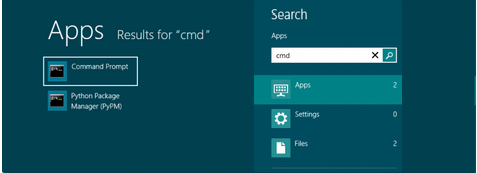
This article gives you a detailed tutorial about creating an Ad Hoc WiFi Network in windows 8 or 8.1. Basically this tutorial is for windows 8.1 users who are using windows 8 there may be a little changes that you can understand. Let us move on to the detailed steps: Step 1: First of all open your Command Prompt (Open Start menu and then search ‘cmd’) or press (windows button + R) and type 'cmd'.