Posts

8 Things to do Before Applying for Google Adsense

Image
Everyone wants to monetize their website or blog by using a proper Adsense and make some through the Google Adsense program. Here in this article I'll tell you how to apply for Google AdSense and what are things one can do before applying to Google Adsense. It is not easy to approve for google Adsense now-a-days and you have to follow few things before applying for google ad services. I will tell you the ways to get approved very easily and make money through Google Adsense program.

How to Put or Place Google AdSense Code Below Post Title on Blogger.com

Image
Every blogger or webmaster use AdSense to monetize their blog, Google AdSense is the popular and most of the bloggers are using this to generate best income through the ads of Google. But after getting AdSense approval placement of AdSense ad plays a crucial role for generating the income. You might have observed in many Blogs (including my site as well) AdSense ads at below post title and end of the post, in this situation you may have a doubt that why myself and other blogger use AdSense at below post title and end of every post? It is because placement of ad in this two places increases CTR (Click Through Rate) of AdSense . If you are a WordPress user then you can place ad anywhere by using plugins, but if your site is on blogger platform and you are a new to the field of Blogging then its little bit difficult for you to place ad below post title, but don't worry. Today in this article I'll show how to put AdSense ads below the title of the post in the Blogger platform. Bu...

What is CTR in Google Adsense

Image
CTR is acronym for Click Through Rate. In the world of Internet marketing, CTR matters a lot for advertisers and publishers too. When coming to roles, advertisers role is to create such ad graphics or sales line, which should get more CTR and publishers role is to place the ad in such a way, which increases the CTR. When coming to a Blogger point of view, CTR is one of those factor, which plays a vital role for generating money and retaining the advertisers. If you failed to give enough clicks, your advertisers will run away. Now we will enter into the topic what is CTR and understand actually what it is. What is CTR? As I said above, CTR stands for Click Through Rate. In simple words it means that number of times an advertisement (ad) is clicked divided by number of ad unit containing page is viewed. It is percentage of no. of clicks on advertisement and number of pageviews. CTR = Number of Clicks / Number of exposures. CTR = Number of Clicks * 100 / # of exposure...

Essential Programming Skills Required for Blogging

Image
Anybody can blog without any programming and coding skills and learning those skills is not mandatory. One can blog without any programming skills at all. But having a new skill is always added an advantage and it is helpful in various ways. If you know any programming knowledge at all like HTML, PHP AND CSS will be very much helpful for online work.

Tutorial - How to Download Google Search Hstory

Image
Google now allows us to download and export our search history at any time. Last year Google tested for that feature and it is now available for everyone. Some of us think that what is the use of this history downloading feature, but we have to know that what Google is storing your history behind your sense. This feature is discovered by a blog and it tells the Google now let’s your export all your search history to Google Drive and then by you can download he search history in a ZIP file format. How to download Google Search History? Step 1: To download your search history, first you need to sign in to that account then head on over to Google Web History. Now click on the gear button and click on download. Step 2: Now Google will display a warning message as your Google search history may have some sensitive information. It will be good if you are not downloading your search archive at public or shared computer. Now click on create Archive button. Step 3: It ...

Five Steps to Connect an Ad Hoc WiFi Network in Windows 8.1

Image
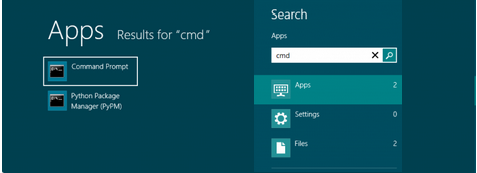
This article gives you a detailed tutorial about creating an Ad Hoc WiFi Network in windows 8 or 8.1. Basically this tutorial is for windows 8.1 users who are using windows 8 there may be a little changes that you can understand. Let us move on to the detailed steps: Step 1: First of all open your Command Prompt (Open Start menu and then search ‘cmd’) or press (windows button + R) and type 'cmd'.